macOS

Put it down.
Pick it up anywhere.

Nearhand is a shelf at the edge of your screen. Push your pointer against the edge and it slides out. Drop a file on it and it waits — through app switches, restarts, and the twelve other things you got distracted by.

macOS 14 or later · 14-day trial, no account needed

How it works

No window to manage

01

Reach the edge

Rest the pointer against the right edge for a moment and the shelf slides out. Or start dragging a file — it comes out to meet you.

02

Drop it

Files, folders, screenshots, clipboard images. They're copied in, so moving or deleting the original doesn't matter.

03

Drag it back out

Into Finder, an upload field, a chat, a terminal. Lock an item to keep a copy on the shelf after it leaves.

The shelf

A staging area that stays put

Dragging between two windows means arranging two windows. The shelf removes the second one: park things at the edge, go find where they're going, come back.

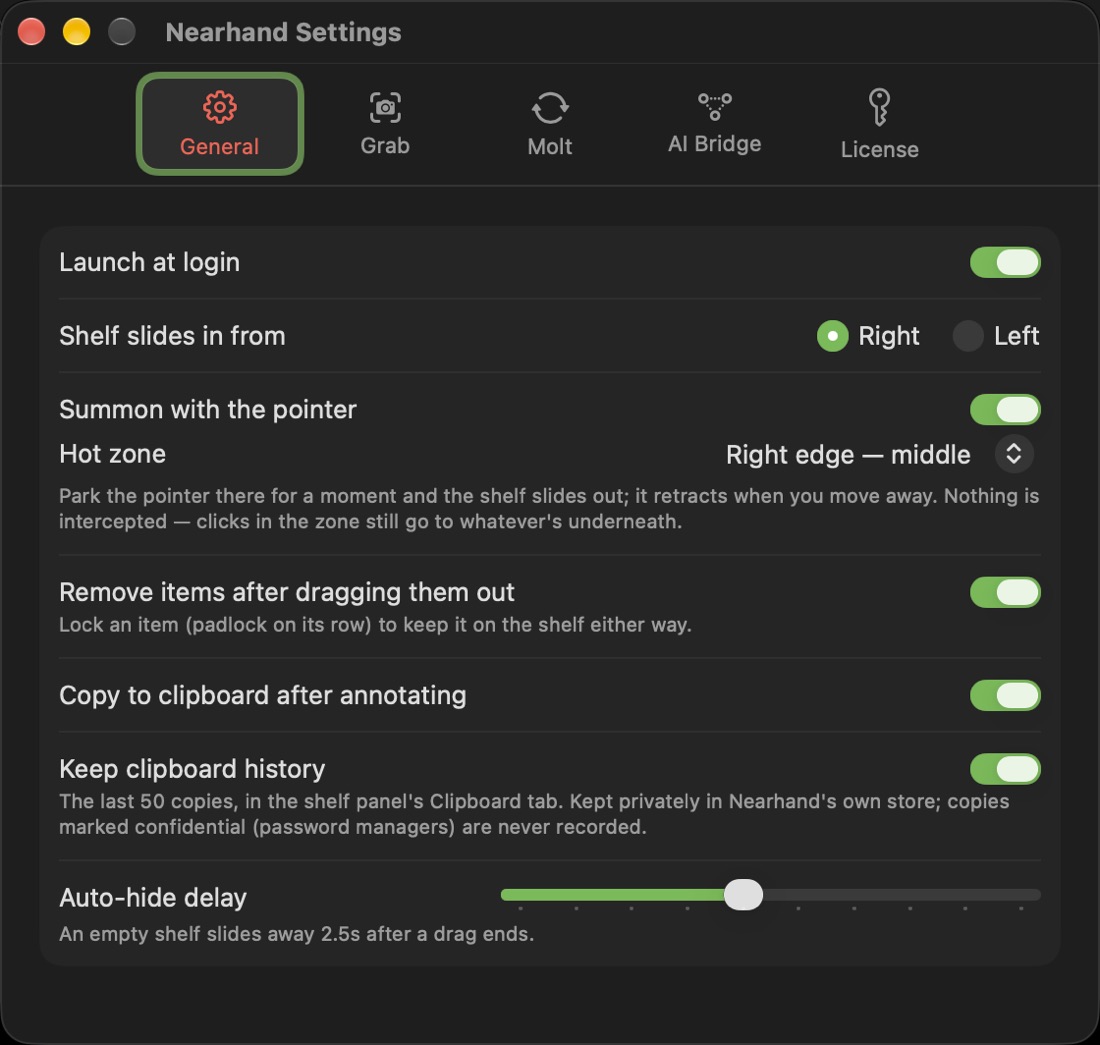
  • Pin it open, or let it hide itself after a drag
  • Choose which screen edge or corner summons it
  • Clipboard history in a second tab — the last 50 copies
  • Quick Look preview with the spacebar, just like Finder
Nearhand settings: which edge the shelf slides in from, the pointer hot zone, and auto-hide delay
Capture

Grab it, record it, mark it up

Everything you'd otherwise need three apps for, landing straight on the shelf.

Grab

Region, window, or the whole screen. Scrolling capture stitches a long page into one tall image while you scroll it by hand.

Record

Screen video with your voice, a webcam bubble, and click ripples. Captions are transcribed on your Mac into a WebVTT sidecar — the audio never leaves.

Annotate

Arrows, boxes, ellipses, pen, highlighter and text. Crop, pad to an aspect ratio, or cut the subject out of its background. Saving keeps the previous version.

Molt

Shrink it before you send it

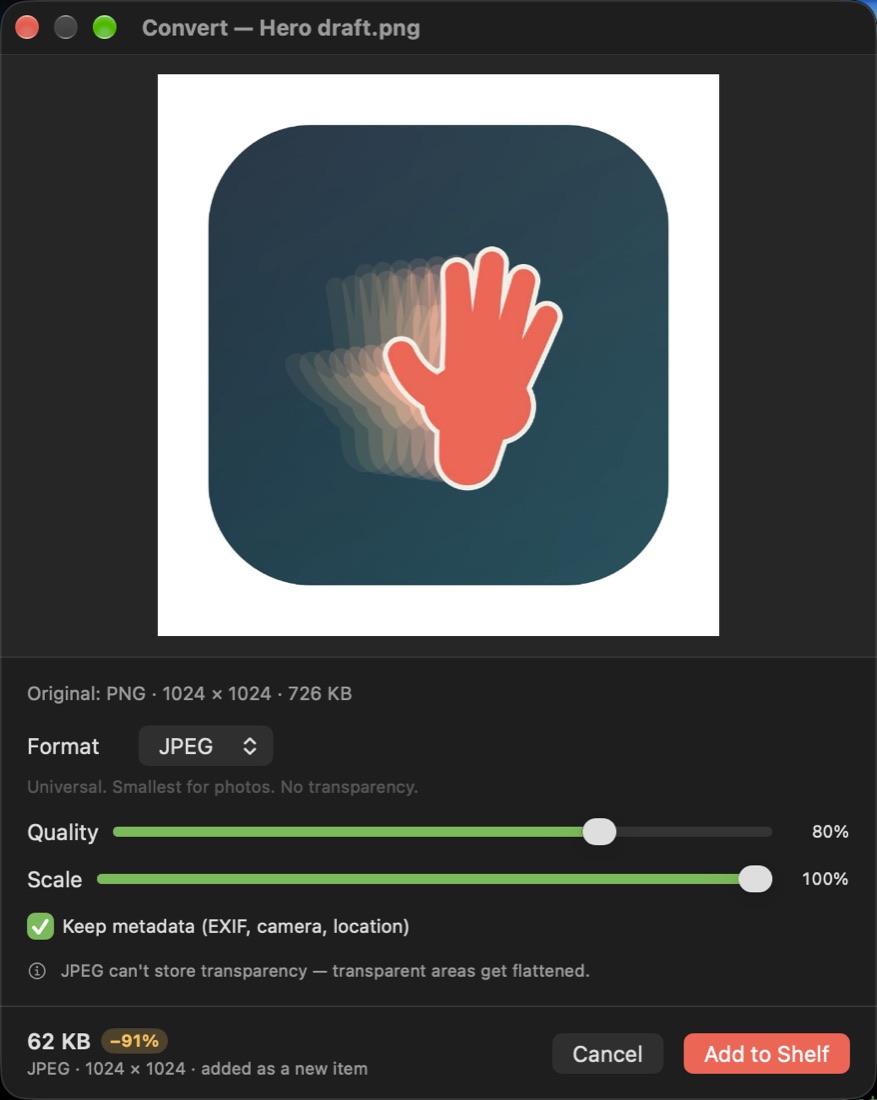
Pick a format, drag quality and scale, and watch the real output size — not an estimate, the actual encoded bytes. The converted file lands as a new item and your original stays exactly where it was.

  • JPEG, PNG, HEIC, TIFF and WebP where macOS can write it
  • Keep EXIF and location, or strip them on the way out
  • Or set a rule once — every HEIC you drop becomes a JPEG automatically
Nearhand's Convert window: a preview, format picker, quality and scale sliders, and a 62 KB result that is 91 percent smaller
AI Bridge

Hand the shelf to Claude

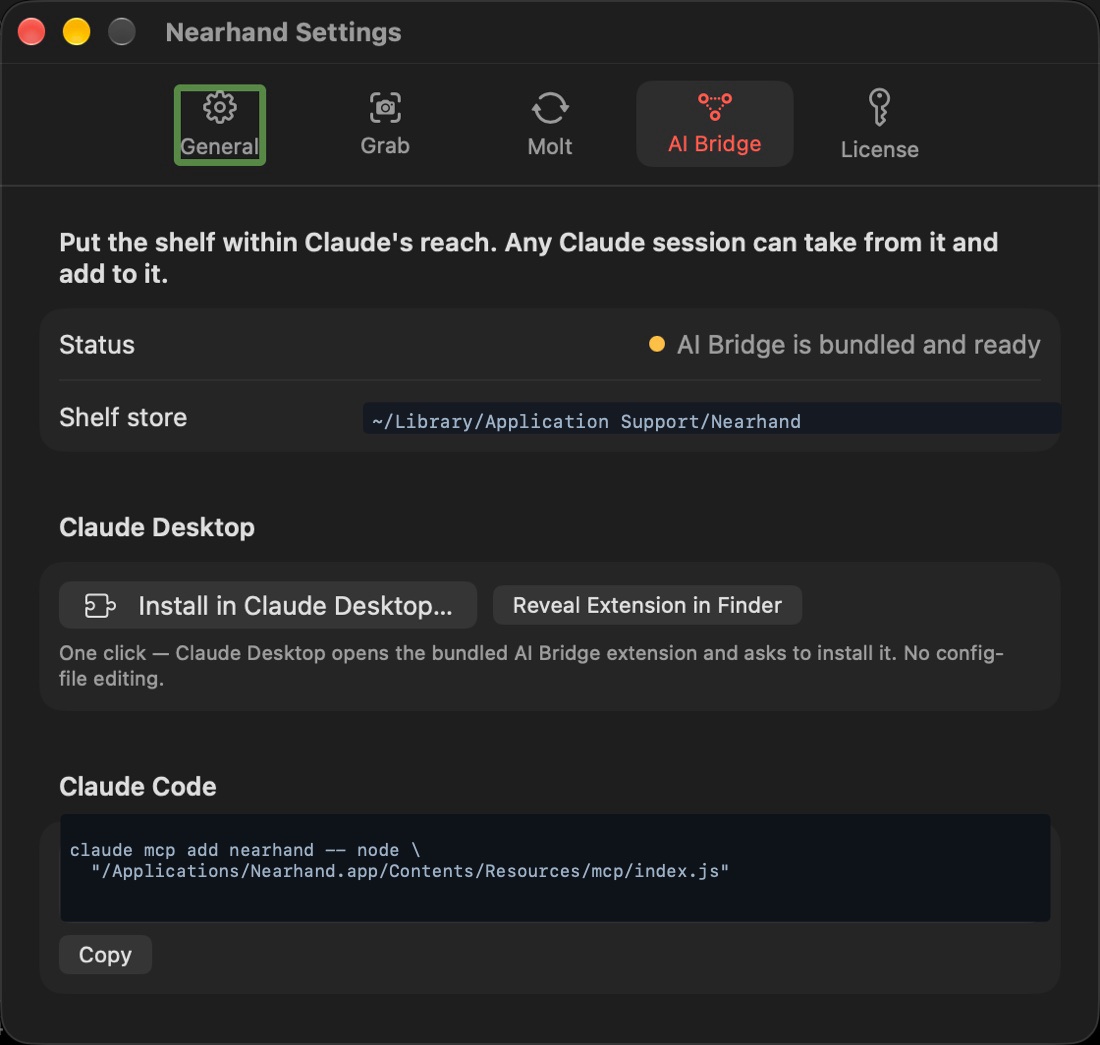
Nearhand has an MCP server. Register it once and any Claude session can read what's on your shelf, add to it, convert an image, or take a screenshot — without you pasting file paths around.

  • A one-file install for Claude Desktop, one command for Claude Code
  • Runs against your local shelf — nothing is uploaded to make it work
  • Works even when Nearhand isn't running
Nearhand's AI Bridge settings pane showing install buttons for Claude Desktop and the Claude Code command
In development

Share a link, not a file

Nearhand Cloud turns anything on your shelf into a link that expires when you say so — and gives video and images a page where the people you sent it to can talk back.

Comments land on the frame they're about

A shared recording plays in the browser with its captions. Anyone with the link can leave a note pinned to a timestamp, or draw on a still — so feedback arrives attached to the moment instead of described in a paragraph.

  • Timestamped comments and drawn annotations from viewers
  • Captions travel with the video; audio-only shares get a transcript
  • Require a passphrase, set an expiry, or revoke a link outright
[your-domain]/s/9f2c…#key-never-sent
“…and this is the step that keeps timing out.”
RK [Reviewer]0:14 This is the retry loop — can we cap it at three?
JP [You]0:33 Circled the field that's wrong. Everything else can ship.

Upload on your terms

Send one item when you want a link, or switch on auto-upload and have everything you shelf sync in the background. Your whole shelf, on every Mac you own.

Workspaces

A shared shelf for a team. Per-member access, roles, revocation, and a log of who opened what and when.

Browser extension

Nearhand already grabs full pages from Chrome onto your shelf — install the clipper. It will pick up share links and drop-to-upload too.

Security

We'd rather not be able to read your files

The cloud side is being built end-to-end encrypted from the start. This is the design we're holding ourselves to — the Mac app ships today without any of it, because nothing leaves your Mac unless you ask.

Sealed before it leaves

Every item is encrypted on your Mac with a per-item key using AES-256-GCM. Item keys are wrapped by your account key, which is derived from a passphrase we never receive. What lands on our servers is ciphertext and a size.

Share links carry their own key

The decryption key rides in the URL fragment — the part a browser never sends to a server. We can serve the bytes and still not open them. Revoking a link deletes the ciphertext, not just the page.

Expiry, passphrase, revocation

Every link gets an expiry you choose, optionally a passphrase on top, and a kill switch. Workspace items add per-member key wrapping, so removing someone actually removes their access.

The honest trade-off

If you lose your passphrase, we cannot recover your files — that is what "we can't read them" costs. Recovery codes are issued at sign-up, and the app says this plainly before your first upload.

Independent security review and a published threat model before Cloud leaves beta.

Pricing

Pay for the cloud, not the shelf

The Mac app is a one-time purchase and works forever offline. The tiers below are the hosted side.

Local
[PRICE]one-time

The shelf, Grab, recording, annotation, Molt and the AI Bridge. Nothing leaves your Mac.

  • Unlimited local shelf
  • Screen recording with captions
  • AI Bridge for Claude
  • No account required
Download
TeamPLANNED
[PRICE]/ seat / month

Shared workspaces with per-member access and an audit trail.

  • Everything in Cloud
  • Shared workspace shelves
  • Roles and instant revocation
  • Access log per item
Talk to us

Prices and storage limits are placeholders until they're set.

Questions

The short answers

Does anything get uploaded today?

No. The shipping Mac app is entirely local — the shelf, your clipboard history, recordings and conversions all live in Nearhand's own folder on your disk. Cloud is in development, and it's opt-in when it lands.

What happens to my files if I stop paying?

The Mac app is a one-time purchase, so the shelf keeps working. If a Cloud subscription lapses, existing share links stop resolving and your items stay on your Mac — nothing local is ever held hostage.

Does it need Accessibility or Screen Recording permission?

Never Accessibility — Nearhand doesn't use event taps or input monitoring. Screen Recording is only requested the first time you use Grab or Record, and not at all if you never do.

Can people I share with edit my file?

No. A share link grants viewing, plus commenting if you leave that on. The original on your shelf is never modified by a viewer.

Is there a Windows version?

Not planned. Nearhand leans on macOS drag-and-drop, Quick Look and ScreenCaptureKit heavily enough that a port would be a different product.

Try it for a fortnight

Full features, no account, no card. If it doesn't earn its place on your screen edge, nothing happens.

macOS 14 or later · Apple silicon and Intel

Free companions

Both are optional, both are free, and neither ships inside the app — install them when you want them.

AI Bridge

Let Claude Desktop or Claude Code read what's on your shelf, instead of you attaching files again by hand.

Get the AI Bridge Claude Desktop & Claude Code · 299 KB

Web Clipper

Grab a whole page — the full scroll, not just what's on screen — straight onto the shelf, with its URL and console alongside.

Get the Web Clipper Chrome, Edge, Brave, Arc · 31 KB